2010. október 27., szerda

Revised specifications for the Notion Ink Adam

As the Adam is approaching its public release, some parts of the specification have changed compared to the originally published spec and there is now some information about the target pricing as well. Of course any of it is subject to change. Some of this information is not even corrected on the official Notion Ink website but was posted on their blog.

The bezel of the tablet has been slightly enlarged (as can be seen on the picture):


There will be four base variants of the Adam:

  • PixelQi screen, wi-fi

  • PixelQi screen, wi-fi, 3G cellular modem

  • Ordinary LCD screen, wi-fi

  • Ordinary LCD screen, wi-fi, 3G cellular modem


Both the PixelQi and the ordinary LCD screen will have capacitive, multi-touch interface and 1024x600 resolution, anti-glare coating (matte finish). This is especially useful for reading and outdoor use. PixelQi variant is usable in direct, strong sunlight.

There is no info yet on the HSDPA/HSUPA speeds for the 3G cellular modem.

For internal storage, 16 and 32 GB flash will be selectable.

Common specification elements:

  • Nvidia Tegra2 System On Chip operating at 1Ghz (dual-core ARM Cortex-A9)

  • 1 GB of RAM (DDR2, 667Mhz)

  • WLAN 802.11 b/g/n (previously it was not known whether it will have "n" as well)

  • Bluetooth 2.1 EDR with A2DP (for stereo bluetooth headsets)

  • External loudspeakers (expected to be good quality for enjoyable video playback), external microphone, headphone and microphone jack

  • 3.2 Mpixel swivel camera which will be usable for both taking photos and video calls

  • 2 normal size USB ports and 1 mini-USB port

  • HDMI output

  • microSD card slot

  • Docking port

  • 3-axis accelerometer

  • Ambient light sensor and automatic screen backlight adjustment (this will have a big, positive impact on the battery runtime)

  • Manual LCD back-light switch (most useful for the PixelQi variant)

  • Standalone GPS chip and antennea (with support for A-GPS quick positioning). The Adam will be capable for navigation without 3G network coverage

  • Sound volume keys

  • Backside trackpad (this is an interesting part, check the videos on Youtube)

  • 24 Wh battery (3-cell configuration). Expected runtime is 15 hours for wifi browsing (recently reported on the blog), 140 hours of listening to audio, more than a week standby

  • Operating system is Android Froyo (2.2) with a custom, tablet-enhanced user interface


It is not yet known whether the Adam will have a digital compass (for better navigation and augmented reality apps). It has been asked on the Notion Ink blog comments but no confirmation yet. It would be very much logical to have it in a machine with this hardware level but the long-time omission from the specs indicates otherwise.

Target end-user prices are between $400 and $500 for the 4 variants in the US. Their target is to keep even the fully loaded variant below the price of the entry level iPad.

Availability/release of the Adam is not finalized, but the Early Access Program winners (developers) are expected to have their machines shipped around November 15. Public release should happen soon after in order to make the Adam available for the Christmas shopping season.

Sources:

DDR2

2010. október 22., péntek

My dream: Java SE on Android Linux

Although the Oracle - Google Java lawsuit looks ugly, there is a possibility that something good comes out of it: full Java SE appications running on Android.

That would be an awesome success for Oracle since it is by nature (steward of Java) interested in running Java applications in Android devices. Devices shipping with Android (tablets with dual-core ARM processor and 512Mb to 1 GB of RAM) are powerful enough to run full Java applications, even with Swing. Desktop applications are quite common in the enterprise space and would make Android devices very appealing in this segment. Especially in the tablet form factor.

Due to the overwhelming success of Android, Oracle would gain a lot of possible support contracts for Java SE on Android (support contracts are the ones Oracle is usually after)

Oracle should get over the need for controlling where Java SE can go (it is currently not allowed on phones) and remove these restrictions. Most of them don't make any sense anyway.

Google and Oracle should work together to create a flawless SE JVM for Android (the Linux runtime is probably a good basis for that) and make sure that graphical Java programs (Swing) run nicely and feel native on Android. Sun has made a lot of optimizations for ARM Cortex A9 level processors, that work should not be lost.

Synergies between Java and Android are already very strong, this step would correct Google's original mistake of leaving out SE compatibility of Android (I know the reasons but still I think it was a big mistake nontheless).

2010. október 14., csütörtök

The biggest mistake Palm has made with WebOS

Palm's WebOS (a Linux variant) based phones have been out for a while but I haven't had the need to consider them until recently (in the form of my Treo 650 broken down).

My Treo 650 was a real workhorse, containing hundreds of contacts, thousands of calendar entries (I use the calendar actively and like to keep entries for a very long time for reference), lots of todos and memos. As a long time Linux/Ubuntu user, I have synchronized and backed up my Treo with JPilot, which is an excellent Linux application. In the past, I have used several Palm devices and I was always able to migrate my complete PIM database with ease between the old device and the new one.

Now that my Treo seems to be dead, I was considering buying a Palm Pre. Researching the Pre, I soon learned that the old synchronization protocol (Hotsync) doesn't work at all with the Pre and there seems to be no way to correctly synchronize the Pre with my Linux desktop. Since I store relatively sensitive information on the Treo, I would never synchronize my PIM database with a cloud service like Google. Thus, Palm's new Synergy sync methods are practically useless for me.

This problem is not only related to the Linux desktop, Windows users are affected as well but they at least have existing third-party options for synchronizing the Pre with Outlook.

Now, this is a real show-stopper for me and lowers the Pre from a trusted Palm device to the level of the average smartphone in my eyes. Palm seems to have lost an avid user since if my workflow is broken anyway, I might as well switch to Android. Android has a much bigger community than WebOS, so there is a bigger chance that I find a well working syncing solution to the Linux desktop.

It is also ironic that although Palm's new WebOS is a Linux device, Palm has decided to break compatibility with the Linux desktop since the only working way between them was HotSync.

It should have been of paramount importance for Palm to ensure compatibility with its own Palm Desktop software and all of the other desktop software which was communicating with Palm devices over HotSync. Currently, Treo owners don't have an easy way to upgrade to the Pre/Pixi since their PIM databases cannot be easily migrated to the new device the way they are used to. As a fair chunk of Treo users were business people, I am sure, most of them are NOT comfortable with their PIM database stored in the cloud. Palm should understand that cloud storage with Synergy - while a good thing - is NOT a replacement for HotSync in a lot of user scenarios.

I believe that Palm's lower-than-expected sales of the Pre and the Pixi can be amounted to this, incompatibility with the old ways and the well-working syncing solutions and desktop tools. Their established Treo/PDA customer base will simply switch to other phones and leave them. This way they loose all of their inherited advantage with this people.

If they want to save the customer base which is still on PalmOS, they should VERY QUICKLY create the HotSync client for WebOS or create a HotSync Synergy plugin and restore compatibility with the Palm Desktop and all of the other desktop software which are still using Hotsync.

2010. szeptember 17., péntek

That's what I call Linux mobility: Smart Book from Always Innovating

Always Innovating has recently introduced its latest creation, the Smart Book. See the Slashgear article here and the product page here about this brilliant device.


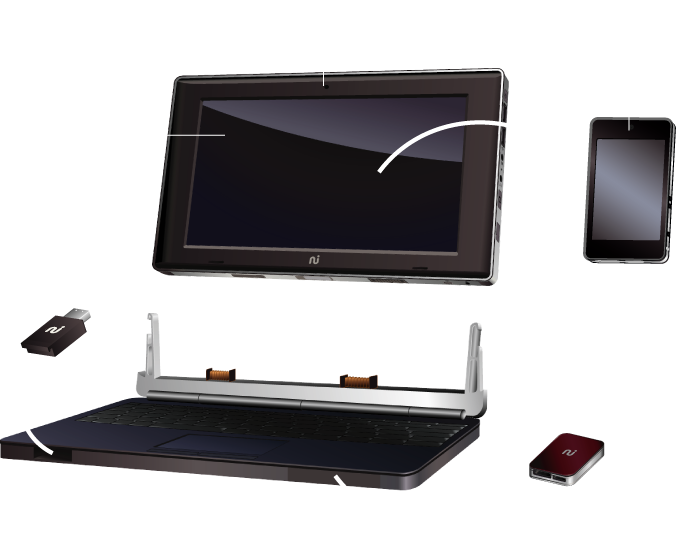
The Smart Book is an ultra-modular, ultra-mobile computing device, which integrates an IP phone, a tablet and a netbook into one, Linux based machine. Although, there is not enough information (yet) about the exact nature/working of the hardware/software components, the modularity of the device is stunning.

As the basis, you have a MID / IP phone unit which houses a Texas Instruments Cortex-A8 (likely an OMAP3) SOC with a powerful graphics core and 512 Mb of RAM. This is the computing core of the whole set. It has microSD slot for extra storage and a 1500 mAh battery. You may use this for quick email checking and limited web-browsing if you want to carry only a very small device with you.

When the need arises, the MID can be inserted into a tablet "jacket". This provides an 8.9"screen and an extra 6000 mAh battery for the computing core (the IP phone). You can use the tablet for comfortable browsing/email reading/book reading and you can still accept phone calls with a bluetooth headset.

If you need to do some serious typing (or run out of the battery of both the tablet and phone-core), you can dock the tablet into a stand with a keyboard which makes the device a proper netbook/laptop and gives you an extra 12000 (!!!) mAh battery capacity. When this happens, you may switch the computing core to a full Ubuntu Linux from the Android you used on the MID. This is done with a dedicated hardware button (called the AI button).

The battery life is not yet known, but if the battery capacity figures are real, it should be brutal. Some assumptions for the web browsing activity on wifi:

  • 3-4 hours for the MID alone (1500 mAh)

  • 10-14 hours for the tablet set (1500 + 6000 mAh)

  • 20-34 hours for the netbook set (1500 + 6000 + 12000 mAh)


Some other goodies:

  • One of the cases (tablet or the stand) can house a USB key so it won't protrude from the device and you can safely ship it, always inserted into the device, removing only when you need to stick it into an other computer.

  • The tablet can be used as a secondary display for an arbitrary computer which has a USB port (by DisplayLink technology)

  • The MID has an HDMI out so it can directly connect to a TV

  • You get a USB-HDMI converter in the pack which can be used independently (e.g. connecting an arbitrary computer with no HDMI out (only USB) to a TV). This also uses DisplayLink at its heart. The converter unit can be inserted into the dock (like the USBkey) so you will not loose it.

  • The keyboard dock can be used as a bluetooth keyboard with any arbitrary computer, not only with the tablet/MID combo.


The modular sales method is also well thought-out. You don't need to buy the whole device in one go for $549. You can buy it one-by-one, $199 a piece.

My grievances with the machine:

1) The seeming lack of computing power. I would like to have at least dual-core Cortex-A9 SOC with 1Gb of RAM. I perfectly understand the design reasons leading to the single computing core solution (only this can result in an affordable price for the whole system) but I still think that the OMAP3 core is not enough for netbook-strength applications like OpenOffice and Firefox and the 512Mb of RAM is very much on the borderline for a Ubuntu Gnome desktop. If this machine had some Tegra2-level processing guts and more memory, I would shout "Ipad killer" and try to register a pre-order entry (which is already available, by the way).

2) The MID should be a real mobile phone with a sufficiently powerful HSPA modem, phone buttons and it should run a phone oriented GUI of Android. This would make the whole idea a one-stop solution for most of the mobile computing needs of the average people (including myself). I hope AI will soon create a version which has a real phone as the core of the Smart Book set.

That said, I believe the concept is brilliant and Always Innovating may very well have created a good implementation which will be successful on the market.

2010. július 13., kedd

Official Linux development kit for Tegra2

It's been a while since I reported that Nvidia would support Linux on the Tegra2 development board. At that time, "support" meant an internal, non-public OS image for Nvidia developers and a promise  for an official, public Linux Development Kit (LDK) to be released "soon". Unfortunately, things were only crawling along since then so some of the prospective Tegra2 developers got quite frustrated with the lack of an official LDK for this advanced ARM hardware.

Finally, Nvidia developers caught up with the demand and released the first version of the official LDK dubbed as Linux for Tegra (L4T). The announcements on the Tegra2 developer forums is here.

Now, we can hope that this development kit can become the basis of targeted Linux distributions for the upcoming Tegra2 based machines such as the Notion Ink Adam and the Boxee Box.

I, for one, will only buy a Tegra2 tablet or smartbook if there is realistic chance that I will see a well working, full-Linux distro on it sometime soon. I may use Android on them for a while but I certainly think that such powerful hardware demands a proper, full-Linux operating system on it. I will be happy to use MeeGo, Ubuntu Unity or some other touch-oriented desktop-GUI and its widgets but absolutely expect to run OpenOffice, Firefox and other powerful apps when I attach a keyboard to the machine.

2010. június 27., vasárnap

Toshiba AC100 smartbook: with Android but why?


The AC100 smartbook, recently announced by Toshiba, has some intriguing features, worth to blog about. First of all, it is built around Nvidia's Tegra2 system-on-chip (SOC). The Tegra2 is a powerful, ARM SOC with two generic application processing cores and integrated media cores (AV decoding/encoding...etc). The AC100 is the most promising netbook form-factor machine with Tegra2 to date. (Of course there are a lot of Tegra2 based systems announced, but those are mostly tablets). Smartbooks already on the market (HP Airlife, Sharp Netwalker), suffer from lack of performance (due to a combination of underpowered, single-core, Cortex A8-level SOCs and/or slow RAM) and are not considered as breakthrough products (at least not in the blogosphere).

The AC100 has a chance to be a successful product in the netbook/smartbook category. Although the hardware has some weaknesses (only 512Mb of RAM instead of at least 1Gb, only one USB port, very small resolution LCD), it has a solid brand name written on it, and the Nvidia foundations are appealing.

I expect the factory installed Android 2.1 perform acceptably but I don't think it is the ideal OS for this device. Android's touch oriented GUI won't shine on the AC100 simply because the machine lacks a touch-screen and Android's software selection is simply no match for this hardware.

Laptop-like smartbooks with keyboards (like the AC100) are much better served with a full-desktop Linux due to the fact, that on these devices, buyers will expect full-fledged applications like OpenOffice, Thunderbird, Firefox…etc. Android would be very limiting for the use cases expected from a netbook/smartbook (editing complex text documents, spreadsheets, using a full-fledged browser, email client…etc). Tegra2 with 1Gb of fast RAM could run OpenOffice and other desktop software with good performance. Instead, it will be reduced to run mini, Android versions of the real stuff (what is available for Android instead of OO and such). I believe, at this point, Android is much more suitable for content consumption, than content creation. In contrast, the AC100 hardware is definitely suitable for the latter and many potential buyers will find Android as insufficient for their purposes.

I just hope that Nvidia & Toshiba get their act together and quickly release an Ubuntu variant for Tegra2 based systems because I am afraid the OS part of their AC100 offering is much weaker than the hardware. The Android 2.1 can remain the factory default but the easy install option of a solid, full-desktop OS should be provided (Ubuntu/ARM is just that). I would also suggest increasing the amount of RAM and the USB ports in order to make the product directly comparable to Atom netbooks (and not be ashamed after the comparison). With these improvements, Toshiba could create a very strong contender for the business of those who are waiting for a powerful smartbook or tablet and not willing to compromise with Apple's offering.

2010. február 13., szombat

Are smartbooks and Linux meant for each other?

Smartbooks are an upcoming mobile computing device category built around ARM's Cortex A8 and A9 line of processors. These devices are awaited with great anticipation because they promise a mixture between smartphone features (ultra-portable, 3G connected, always-on) and the functionality of netbooks/laptops (>9" screen, seamless web browsing, laptop-like computing performance...etc) at a price point lower than that of current netbooks (sub-$300). Some smartbooks will arrive in the tablet form factor, some of them will come in the more traditional laptop form factor. All of them are expected to be comparable to netbooks in processing power (see this and this).


It is an intriguing question whether smartbooks will widen Linux adoption and erode the often criticised monopoly of Windows on pc-like computing devices.

Since the desktop line of Windows currently doesn't run on ARM processors, we can exclude XP/Vista/7 from the list of likely contenders as smartbook operating systems. Windows 7 successors are currently not planned to be ported to ARM and even that wouldn't be a complete solution since Windows applications will have to be ported as well (a very wide, close-sourced ecosystem).

Microsoft has Windows CE for ARM processors. Windows CE has already been deployed several smartbook-like devices (e.g. the original Psion Netbook) so it is definitely a contender in this market. However, WinCE 6.5 currently doesn't support multiple or multi-core processors  and more than 512Mb of RAM so advanced ARM SOCs like the Tegra2 would be very much limited by this OS. Solving multi-processor support will require significant investment from Microsoft. Incompatibility with the desktop line of Windows is also a severe limiting factor for WinCE. WinCE devices cannot be sold on the appeal of general Windows-compatibility, the user will not be able to install Windows applications onto the device.

Linux on the other hand has a very good technical background on ARM. It has no limitations for processing cores and operating memory and has targeted distributions for this architecture. Android is an outstanding example but several well-known distributions - like Ubuntu - have ARM ports in addition to their x86 base edition. Also, due to the fact that most of the Linux applications are open-source, they are at least possible to port, so we can expect the full usual complement of desktop Linux applications to show up on an ARM Linux distribution when the need becomes visible for them.

Technical factors aside, there is always the argument for Linux: being free . This may be important with smartbooks due to the very low targeted price point which doesn't tolerate even moderate OS licensing fees (like $50/unit). So unless Microsoft gives Windows CE for practically free, Linux has the advantage here.

Since Windows CE has practically no advantages over Linux on ARM (in fact quite the opposite), Linux has a fairly good chance to be deployed on smartbooks as the primary operating system shipping with the device. Now, we can get into specifics. What kind of Linux and what kind of GUI?

Google's Android is a very special Linux distribution. It's touch-oriented GUI is simple and usable but it doesn't run X-Windows so lacks the usual full-fledged Linux applications (Android applications are specifically written for the Dalvik virtual machine and its APIs in Java.) With this in mind, and considering the current frenzy around Android, I expect it to be deployed heavily on smartbook tablets. This form-factor is ideal for use cases in which full-fledged desktop applications are not necessary (e.g.: a web tablet with media player capabilities). More advanced Linux users will likely be able to install a full desktop Linux onto their tablets but the average consumer will be satisfied with Android.

However, laptop-like smartbooks with keyboards are better served with a full-desktop Linux like Ubuntu due to the fact, that on these devices, buyers will expect full-fledged applications like OpenOffice, Thunderbird, Firefox...etc. Android would be very limiting for the use cases expected from a netbook/smartbook (editing complex text documents, spreadsheets, using a full-fledged browser, email client...etc). I believe, the exact GUI environment is not really important for this kind of smartbooks although some netbook specific desktop environments (like Ubuntu Netbook Remix and Moblin) may be more efficient for smartbook models with low-resolution screens (below 1024x768).

My conclusion is that every kind of smartbook device can be put to its full potential with a properly customized Linux variant. Manufacturers seem to be aware of this since most of the already announced products are known to ship with Android (e.g.: Notion Ink Adam) or hinted to ship with some kind of Linux (e.g.: Lenovo Skylight).